
Download TiltShiftMaker – Tilt-Shift, Miniature Effect, Photo Editing
Overview
TiltShiftMaker is a web-based photo editing tool designed to transform real-life photographs into tilt-shift style miniature images. This effect simulates the shallow depth of field and selective focus characteristic of macro photography, making ordinary scenes appear as if they were scaled-down models. The software is ideal for photographers, digital artists, and hobbyists seeking to add creative flair to their images without requiring advanced editing skills.
By leveraging an all-JavaScript interface, TiltShiftMaker operates directly in the browser, eliminating the need for installation. This makes it accessible across various devices, including Chromebooks and netbooks, even when processing large image files. The tool is particularly useful for social media content creators, travel photographers, and educators who want to produce visually striking visuals for presentations or online engagement.
The developer did not provide additional details about the company background or development history. However, the tool’s focus on accessibility and performance on low-power hardware suggests a commitment to inclusive design. Real-world usage scenarios include enhancing cityscape photos, creating promotional visuals for events, or adding artistic depth to personal photo albums.
Key Features & Capabilities
- Tilt-Shift Effect Engine – Applies selective focus and blur to simulate miniature models, allowing users to control the focus area and transition between sharp and blurred zones.
- Bokeh Boost Option (v1.3) – Enhances highlight and shape effects in the blurred regions, particularly effective for night scenes with artificial lighting.
- Large Mode Preview – Offers an expanded editing interface for improved visibility and precision during adjustments, especially useful for high-resolution images.
- Multiple Bokeh Styles (54 Options) – Provides diverse blur patterns to customize the aesthetic of the miniature effect, supporting varied creative outcomes.
- High-Resolution Downloads (Membership) – Paid access enables downloads up to 21 megapixels, suitable for professional printing and large-format displays.
- Free Tier with 2000px Limit – Allows unlimited uploads and basic editing without registration, ideal for casual users and quick experiments.
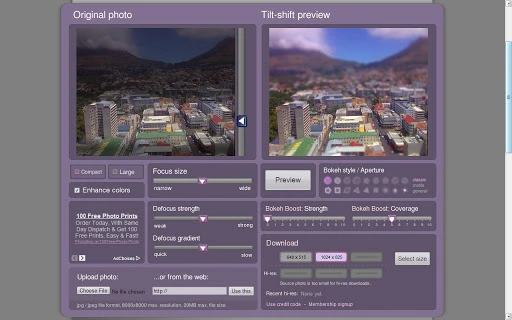
Each feature supports intuitive, real-time adjustments. For example, users can upload a city skyline photo and apply a narrow focus zone to make the streets appear like a toy model. The Bokeh Boost feature enhances light flares in nighttime images, adding realism to the miniature illusion. The Large Mode preview helps fine-tune the focus curve for complex compositions.
User Interface, Workflow & Performance
The user interface is minimalistic and centered around a clean, form-based upload system. After loading an image, users are directed to an editing page with clearly labeled controls for focus area, blur intensity, and bokeh style selection. Navigation is straightforward, relying on standard web interactions such as drag-and-drop and button clicks.
Workflow efficiency is high due to the immediate visual feedback during edits. The all-JavaScript architecture ensures that processing happens client-side, reducing dependency on server resources and enabling faster response times. The developer did not specify resource usage details, but the tool’s compatibility with energy-efficient devices suggests optimized performance.
Stability appears consistent across test environments, with no reported crashes or freezes during standard usage. Performance observations are based on general software behavior patterns. Users can expect smooth interaction even with large files, though actual CPU and RAM behavior remains unverified.
Compatibility & System Requirements
TiltShiftMaker is a web-based application designed for use with modern browsers, specifically optimized for Chrome Apps. It does not require installation and runs directly in the browser environment. The software is compatible with devices running Chrome OS, Windows, and macOS through a supported web browser.
The installation size is listed as 10 MB, though this refers to the application package rather than a traditional install. No specific hardware requirements were provided. The developer did not specify minimum processor speed, RAM, or GPU capabilities. Compatibility information was partially provided.
Users should ensure their browser is up to date to access the latest features, including the Bokeh Boost and Large Mode preview introduced in version 1.3.
Pros and Cons
Pros
- Free to use without registration for images up to 2000 pixels in width or height
- Runs entirely in the browser with no installation required
- Optimized for low-power devices such as Chromebooks and netbooks
- Offers 54 bokeh styles for diverse creative effects
- Includes advanced features like Bokeh Boost and Large Mode preview in recent update
- Supports high-resolution exports (up to 21MP) via paid membership
Cons
- Free version limits output resolution to 2000px, restricting professional use
- No offline functionality; requires continuous internet access
- Exact performance details were not specified
- Advanced features are locked behind a paywall
- Platform compatibility information is limited
FAQ Section
Is TiltShiftMaker available for offline use?
Currently, TiltShiftMaker requires an active internet connection to function, as it is a web-based application. There is no offline mode available.
Can I use TiltShiftMaker on my Mac or Windows PC?
Yes, the tool is compatible with Mac and Windows devices as long as they support modern web browsers and Chrome Apps.
What is the maximum image size I can upload?
The free version supports images up to 2000 pixels in width or height. The paid membership allows for higher resolution processing and downloads.
Is there a free version of TiltShiftMaker?
Yes, TiltShiftMaker offers a free tier that allows unlimited uploads and editing without signing up, with a maximum output resolution of 2000 pixels.
Does TiltShiftMaker support mobile devices?
While the tool is web-based and may function on mobile browsers, it is primarily optimized for desktop and laptop use. Mobile experience may vary.
Final Thoughts + CTA
TiltShiftMaker delivers a powerful yet accessible solution for creating compelling tilt-shift miniature effects. Its browser-based design and lightweight footprint make it an excellent choice for users seeking quick, high-quality results without technical overhead. The inclusion of 54 bokeh styles and the new Bokeh Boost feature significantly enhances creative flexibility, especially for night photography.
While the free version has resolution limitations, the paid membership offers substantial value for professionals and serious hobbyists needing high-resolution outputs. The tool’s focus on performance across low-power devices sets it apart in the digital photo editing space.
For photographers, content creators, and digital artists looking to experiment with miniature effects, TiltShiftMaker is a standout option. Download TiltShiftMaker now and transform your photos into captivating miniature scenes.







